3D Virtual World Series : demonstrating the program Coastal Navigation
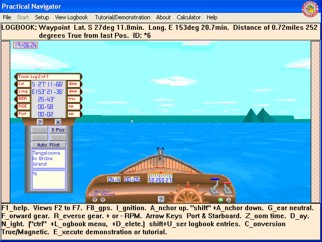
Number 5 : GPS View - supports Forward with Global Position and shows Navigational Aids. 2 positions may be recorded and use as a Route for the GPS to track.


Your Browser Java VM
may be Disabled?
Context Help : is provided for all Control Devices as well as the gps display. Place mouse cursor on the Control and wait 2s.
Compass Heading is in degrees True.
Boat Speed is in Knots. (0 to 20).
Boat distance Log records in Nautical Miles.
Your 3D World is a square area of 10 nautical miles in Moreton Bay Australia between Redcliffe and Moreton Island.
Explore this world by accelerating the Boat and Steering her using the Port and Starboard Controls.
The GPS is a fully fuctional unit which has all the functions of a real GPS. Accelerate the Boat and watch the GPS update your current Position showing Lat,Long,SMG,CMG. Add two Positions to act as Waypoints and then switch the GPS to Route function and see new information Cross Track Error as well as the Bearing and Range to the next Waypoint.
Please Wait for applet to load...   its worth the wait!    Applet not showing? Browser must support Java 1.1 + and be Java Enable

Screen Capture Coastal Navigation includes
Demonstrations and Tests for :
Using Global Positioning System for Navigation.
Course Made Good.
Speed Over the Ground.
XTE - Cross Track Error.
Making a Fix or Waypoint for a Route.
Constructing a Route which can be sailed by the Boat.
Supports:
Adding, Renaming, Moving or deleting Waypoints.
Saving Positions and or Routes which can be reloaded and used again.

Screen Shot from Coastal Navigation - Practical Navigator

Practical Navigator practicalnavigator.com.au © Practical Navigator